
Versa Messaging Service (VMS) is a microservice-based streaming platform used within Versa Networks' SASE and SD-WAN architecture. It serves as a central agent for event-driven data, including real-time threat intelligence feeds, third-party authentications (e.g., Active Directory), and subscriber mobility events across VOS devices.
Core Functions
- Central Broker: Ingests data from third-party agents and services, formats it, and streams it to Versa Operating System (VOS) branches and gateways.
- Third-Party Authentication: Integrates with services like WMI agents connected to Microsoft Active Directory (AD) to handle passive user authentication and track login/logoff events.
- Threat Intelligence Delivery: Receives external threat intelligence feeds (IP, domain, URL) and delivers them to subscribed devices for real-time policy enforcement.
- SASE for SIM: is a clientless solution that helps secure SIM-enabled IoT and user devices connected over LTE/ 4G/5G networks. Manages traffic segregation and mobility services for SIM-enabled devices across telecom networks.
- UEBA: Versa user and entity behavior analytics (UEBA) is a cloud service that provides a layer of security that enables your organization to monitor, detect, and respond to suspicious behaviors across your network infrastructure.
Key Components & Architecture
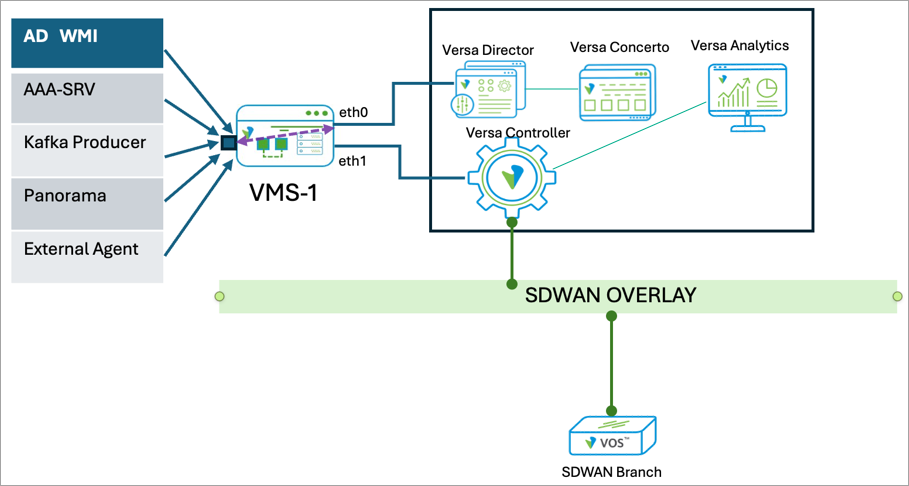
VMS sits in the management and control plane and interacts with several other Versa headend components.
- Versa Director: The UI interface used to configure VMS clusters, provision tenants, and manage VMS connectors.
- Versa Analytics: VMS processes and forwards relevant security logs, exceptions, and alarms to Analytics nodes.
- Versa Concerto: Handles user and group orchestration within the VMS ecosystem.
- VOS Devices: Branch and edge appliances that establish secure gRPC-based connections with VMS to stream configuration updates and telemetry data.
Key parameters in VMS-VOS communication
- VOS connects to VMS over gRPC channel, which uses TCP-1376.
- VOS use VMS certificate to authenticate server. So VOS must trust the certificate offered by VMS. Under VMS profile configuration at VOS, we configure issuing authority of this vms cert.
- In most deployements VMS would be behind VC (Versa Controller) and VOS traffic might be handled by Controller’s ADC module (similar to Analytics cluster). So, VOS traffic will be destined to VC’s VIP, and VC’s ADC will lookup active node, do NAT and then forward traffic to active VMS node.
Troubleshooting Breakdown:
Assuming following assumptions in setup where troubleshooting,
VOS tvi (overlay) IP is 10.0.0.101 Sun-Control-VR
Controller ADC VIP : 10.0.0.10
Controller control IP (connecting to VMS/Headend): 192.168.0.10
VMS would have 3 IPs and FQDNs associated
VMS mgmt. IP : 172.16.1.100 vms.mytest.com For VMS mgmt. access, Director communication
VMS elastic IP: 172.16.1.101 vms-elastic.mytest.com For VMS to talk to external servers (3rd party auth data, threat-intel feed download etc) this is virtual address part of mgmt. subnet
VMS southbound IP: 192.168.0.100 vms-vos.mytest.com For VOS/ADC-VMS communication
- Check vms connection status at VOS
show orgs org-services Sun vms status
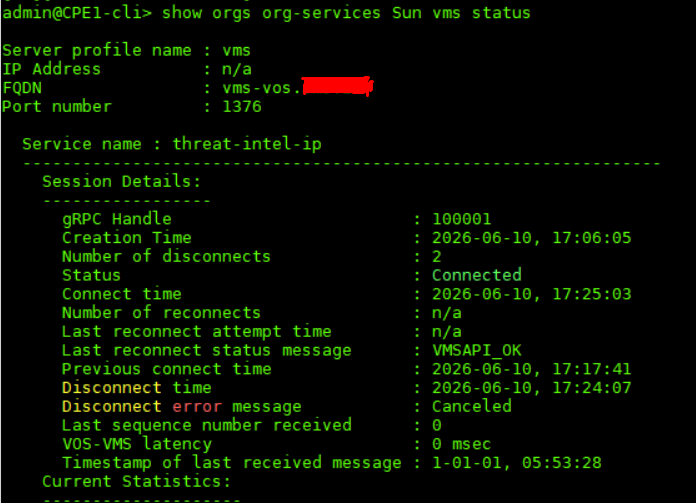
- Check connectivity to vms server. ping vms fqdn (if no fqdn, ping IP) using configured VR and check reachability.
ping vms-vos.mytest.com routing-instance Sun-Control-VR
PING vms-vos.mytest.com (10.0.0.10) 56(84) bytes of data.
64 bytes from vms-vos.mytest.com (10.0.0.10): icmp_seq=1 ttl=64 time=1.11 ms
64 bytes from vms-vos.mytest.com (10.0.0.10): icmp_seq=2 ttl=64 time=1.50 ms
This confirms dns resolution as well as rechability.
- If above is failing check that Controller is receiving this traffic and processing it, ADC is being used to redirect traffic to VMS nodes or if VOS is directly establishing communication with VMS.
If through Controller, check Controller ADC servers/ virtual-service status, active NAT, session extensive and tcpdump at control interface.
Use commands like
show orgs org-services Sun adc virtual-service summary
show orgs org-services Sun adc server summary
show orgs org Sun session extensive | select source-ip 10.0.0.101 | select destination port 1376 | match-all
- Use wget at VOS to confirm reachability / 3-way handshake.
admin@CPE1-cli> wget http://vms-vos.mytest.com:1376 routing-instance Sun-Control-VR
--2026-06-11 00:58:18-- https://vms-vos.mytest.com:1376/
Resolving vms-vos.mytest.com (vms-vos.mytest.com)... 10.0.0.10
Connecting to vms-vos.mytest.com (vms-vos.mytest.com)|10.0.0.10|:1376... connected.
WARNING: cannot verify vms-vos.mytest.com's certificate, issued by 'emailAddress=admin@mytest.com,CN=vms.mytest.com Intermediate Cert Authority,OU=IT,O=Sun,ST=KA,C=IN':
Self-signed certificate encountered.
This provides key information, that the resolution is fine, tcp connection with VMS at port 1376 is also good (connected). Ignore the certificate warning in this part.
- Check CA chain associated with VMS configuration and see if it’s the same one which has signed VMS certificate.
show orgs org-services Sun crypto pki ca-chains vms-ca-chain
Verify this certificate in upcoming Step-9 and it should be the same.
- Lookup versa-service.log at VOS which can give lot more details. Eg. vms server domain is not resolved, connection is refused, or certificate is not trusted.
a. FQDN of vms is not resolved.
2026-06-09 01:12:45.950 ERROR [0x200] vmsctrl_init_grpc_to_vms_srvr_for_svc:515 Resolved IP not available for vms_prof 2 fqdn vms-vos.mytest.com from tenant 2
b. If VMS is configured as IP (at VOS), this IP should be present in the server certificate (presented by VMS) as IP – SAN. If not present an error like this can be seen.
2026/06/09 20:17:47.101307 0000001: vMsClientServiceConnectThread:1407 Message Server connect failed(retrying) for token ClientAuth:threat-intel-domain-name, error rpc error: code = Unavailable desc = connection error: desc = "transport: authentication handshake failed: tls: failed to verify certificate: x509: cannot validate certificate for 192.168.0.100 because it doesn't contain any IP SANs"
c. Below indicates an issue with gRPC connection. TCP-1376 connection timeout
2026/06/10 11:42:20.951637 0000011: vMsClientServiceConnectThread:1407 Message Server connect failed(retrying) for token ClientAuth:threat-intel-ip, error rpc error: code = Unavailable desc = connection error: desc = "transport: Error while dialing: dial tcp4 192.168.0.100:1376: i/o timeout"
d. TCP-1376 connection is refused. Check if any firewall in transit / at Controller is not rejecting it. Do tcpdump at VMS to verify if its server rejecting, check logs for service being requested is inactive (eg. VOS requesting for threat-intel for URL, which may not be active at VMS).
2026/06/10 11:45:06.024283 0000018: vMsClientServiceConnectThread:1407 Message Server connect failed(retrying) for token ClientAuth:threat-intel-ip, error rpc error: code = Unavailable desc = connection error: desc = "transport: Error while dialing: dial tcp4 192.168.0.100:1376: connect: connection refused"
e. VMS certificate is good, but its not having SAN filed (even with single CN, modern deploymenets lookup SAN field). VMS certificate should ideally contain atleast 3 SAN domains (mgmt, elastic and vos/southbound).
2026/06/22 16:48:26.745673 0000152: vMsClientServiceConnectThread:1407 Message Server connect failed(retrying) for token ClientAuth:passive-auth, error rpc error: code = Unavailable desc = connection error: desc = "transport: authentication handshake failed: tls: failed to verify certificate: x509: certificate relies on legacy Common Name field, use SANs instead"
- Use vms/ vmsctrl debugs to get extensive details about the issue
configure
set debug vms all-flags level all send to file name /var/log/versa/vms-debug.log
set debug vmsctrl all-flags level all send to file name /var/log/versa/vms-debug.log
commit and-quit
Above configuration generate debug logs against vms process and will write it under target file. If you don’t give any file path, default is saved in versa-service.log
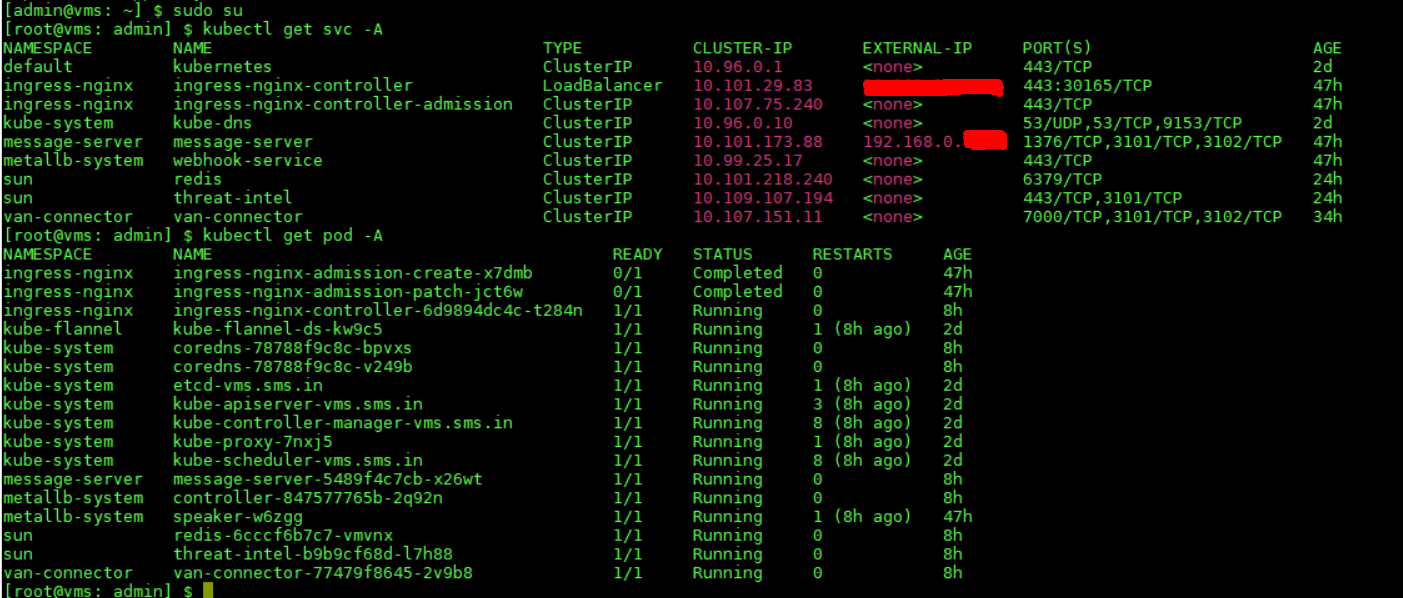
- Lookup VMS services and micro-services status for more info.
vsh status
sudo su
kubectl get svc -A
kubectl get pod -A
- At VMS certificates are typically stored under /opt/versa/vms/certs/ directory. You can check server certificates (server-cert.crt or server-cert.pem), along with CA and Root certs here.
openssl x509 -text -noout -in /opt/versa/vms/certs/server-cert.pem >> Lookup Server Cert
openssl x509 -text -noout -in /opt/versa/vms/certs/ca-cert.pem >> Lookup CA Cert
Cross-Check signing authority is same which is configured in VOS under VMS configuration as ca-chain (lookup point-5 above).
- Check VMS logs for VOS, 3rd party services or other connections. Mostly under the path /var/log/versa/vms/apps/
VMS-VOS connection related logs. /var/log/versa/vms/apps/message-server/message-server.log
Enables 3rd party module related logs will also be under the apps directory. Eg. Threat-Intel logs
/var/log/versa/vms/apps/threat-intel/<Org-Name>.log
VMS logging issue in Analytics. /var/log/versa/vms/apps/van-connector/van-connector.log