
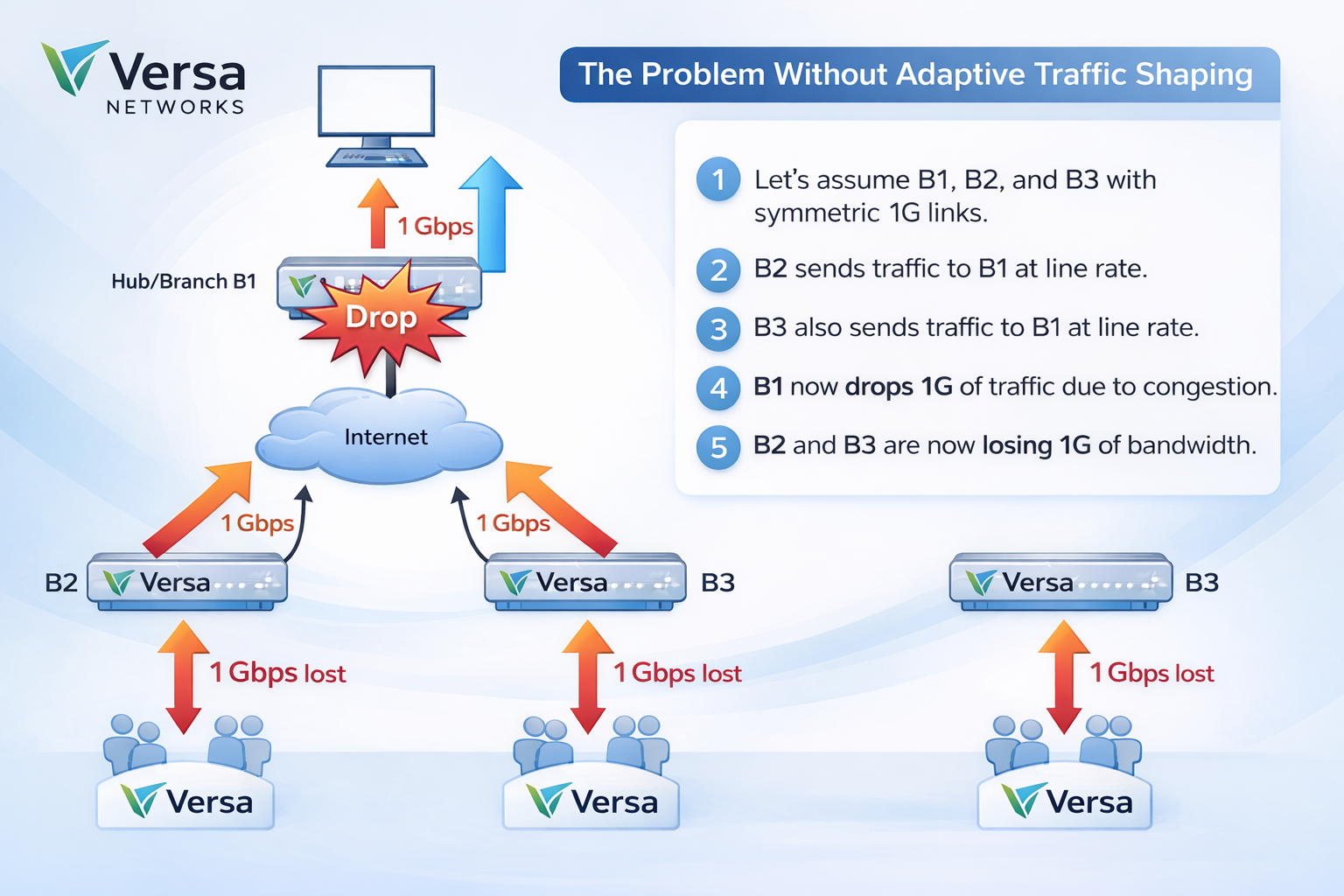
Issue: In any SD-WAN environment—whether Hub-and-Spoke, Full Mesh, or Branch-to-Branch—a destination site can easily become a bottleneck if multiple source nodes transmit traffic simultaneously.
Standard static shaping only accounts for the local egress capacity of a branch. It lacks visibility into the remote ingress health of the destination. Without a real-time feedback loop, the following issues occur:
Ingress Saturation: Multiple remote sites burst traffic toward a single destination, exceeding its physical or licensed bandwidth.
Indiscriminate Tail-Drops: The destination node is forced to drop packets once its buffers are full, often killing high-priority Voice or Video sessions alongside low-priority bulk data.
TCP Global Synchronization: Massive packet loss causes multiple TCP streams to back off and restart simultaneously, leading to inefficient "sawtooth" bandwidth utilization and poor user experience.
Topology Blindness: In a mesh network, a Spoke may have plenty of local bandwidth but be unaware that the specific Spoke it is talking to is currently congested.
Solution: Versa Adaptive Shaping
Versa Adaptive Shaping is a dynamic QoS mechanism designed to prevent ingress congestion at any site—whether a Hub, a regional Data Center, or a peer Branch. By establishing a closed-loop feedback system through the SD-WAN control plane, the destination node actively signals its real-time capacity to all sending nodes. This ensures that traffic is throttled at the source (the sender) before it can overwhelm the destination's WAN link, preserving the performance of high-priority applications and eliminating the "blind" packet loss typical of static shaping.
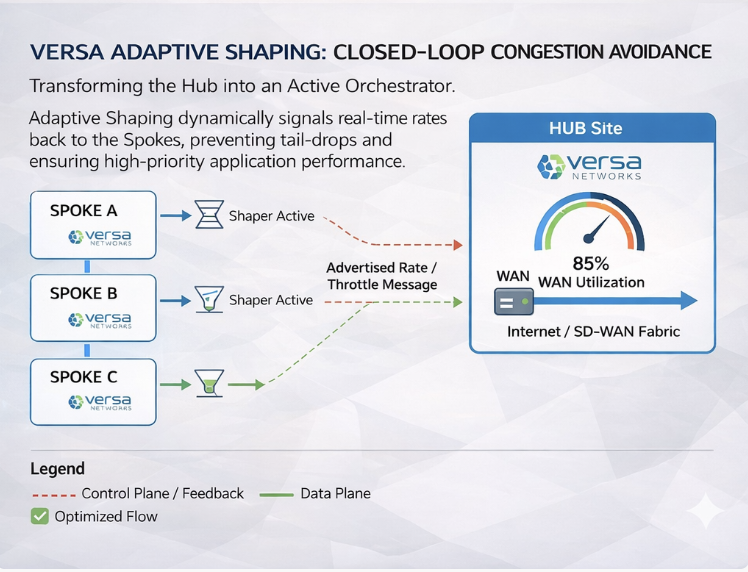
How It Works: The Feedback Mechanism:
When Adaptive Shaping is enabled, the destination (receiving) branch shifts from a passive role to an active orchestrator. The process follows a logical cycle of monitoring, signaling, and adjustment:
1. Control Plane Signaling
The receiving branch communicates its current Input Rate to all sending branches via the SD-WAN control plane. Upon receiving this signal, the sending branches automatically tune their PIPE Shapers (specifically for the path toward that receiving branch) to match that input rate.
2. The Polling & Threshold Cycle
The receiving branch monitors its interface utilization at every configured poll-interval. The adjustment logic is governed by two key thresholds:
High Threshold: If utilization exceeds this mark, the receiver instructs all senders to decrease their shaper rates toward this branch by the value configured in percent-change. This continues incrementally as long as utilization remains above the high threshold.
Low Threshold: When traffic subsides and drops below this mark, the receiver signals the senders to increase their shaper rates by the percent-change value, reclaiming available bandwidth.
3. Stability and Flap Dampening
To prevent constant shaper adjustments due to minor traffic bursts, Versa employs a dampening-count:
The utilization must consistently stay above or below a threshold for a specific number of consecutive polling intervals.
The receiver only signals a rate change once the dampening-count has been exceeded, ensuring that shaper updates are based on sustained trends rather than momentary spikes.
Configuring Adaptive Shaping via Versa Director GUI:
To illustrate the configuration, we will use a 1-Hub and 1-Spoke scenario:
The Hub (Receiver): Acts as the sensor, monitoring its ingress utilization and advertising its "Input Rate" to the network.
The Spoke (Sender): Acts as the actor, initially sending at its full line rate but dynamically tuning its PIPE Shaper based on the Hub's feedback.
Step 1: Define the Base Interface Shaper (The sender)
Before Adaptive Shaping can tune traffic, a base QoS shaper must exist on the WAN interface. Both the Hub and Spoke require this at the port level to define their physical or licensed bandwidth limits.
In Versa Director, navigate to Configuration > Networking > Class of Service > Associate Interface/Network.
Select the relevant WAN interface (e.g.,
vni-0/0) or Network.Configure the Shaping Rate.
Example: If this is a Branch shaped at 200 Mbps, all egress traffic is capped here initially.

Step 2: Hub Configuration Steps (The Receiver)
To enable the feedback loop on the Hub, navigate to Configuration > Services > System > Adaptive Shaping. Configure the following settings in order(below we are configuring default values):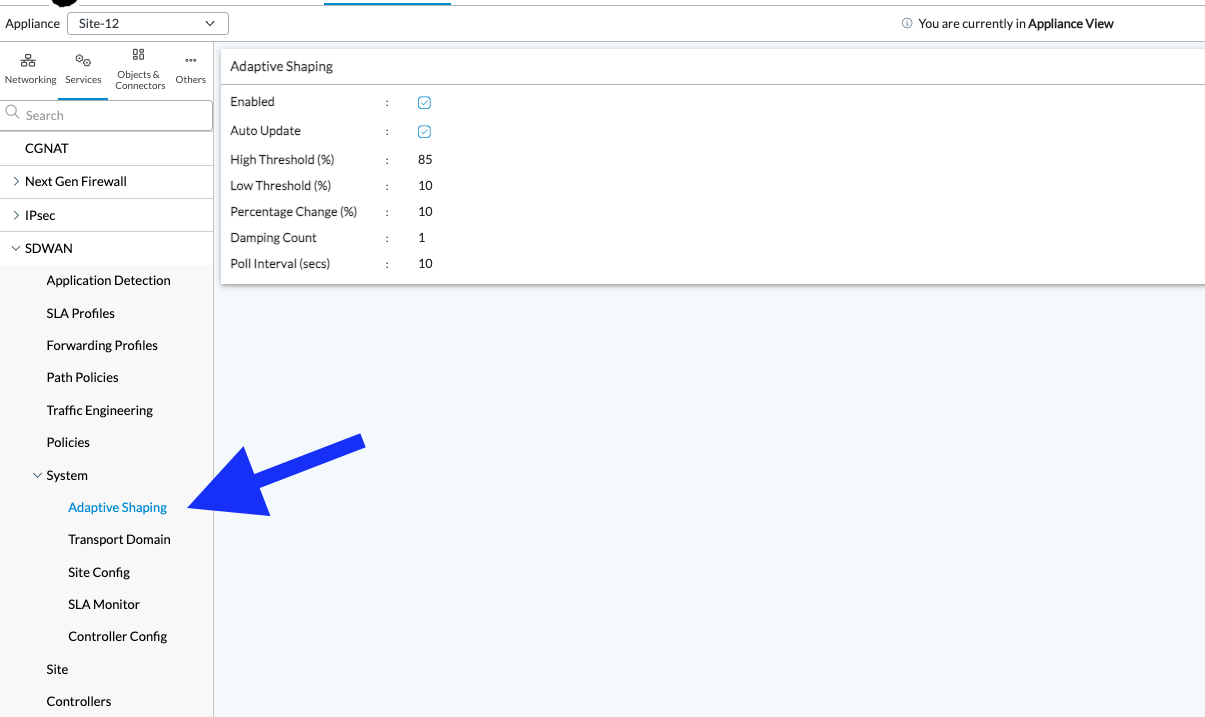
Enabled: Set to Checked. This activates the background process that monitors ingress traffic and generates the control plane signals.
Auto Update: Set to Checked. This allows the Hub to dynamically calculate the "Input Rate" and advertise it to peer branches without manual intervention.
High Threshold (%): Set to 85.
Logic: When the Hub's WAN utilization hits 85%, it triggers a "Slow Down" message to all sending Spokes to prevent the link from reaching 100% and dropping packets.
Low Threshold (%): Set to 10.
Logic: The Hub will only signal Spokes to "Speed Up" once traffic has subsided significantly (below 10%). This creates a wide buffer to prevent the shapers from oscillating (flapping) during minor traffic dips.
Percentage Change (%): Set to 10.
Logic: Every time a threshold is crossed and maintained, the sending Spokes will adjust their shaper by 10% of the current rate.
Damping Count: Set to 1.
Logic: This defines the number of consecutive polling intervals required before a signal is sent. A value of 1 means the Hub reacts immediately after the first interval where a threshold is exceeded.
Poll Interval (secs): Set to 10.
Logic: The Hub will check its interface utilization every 10 seconds. With a Damping Count of 1, the maximum reaction time to congestion is 10 seconds.
Step 3: Configuring the Advertised Input Rate (The Hub)
Once the global Adaptive Shaping service is enabled, you must define the specific Input Rate that the Hub will advertise to the rest of the SD-WAN fabric. This value tells all peer branches (Spokes) the maximum capacity they should collectively aim for when sending traffic to this specific site.
To configure this in the Versa Director GUI: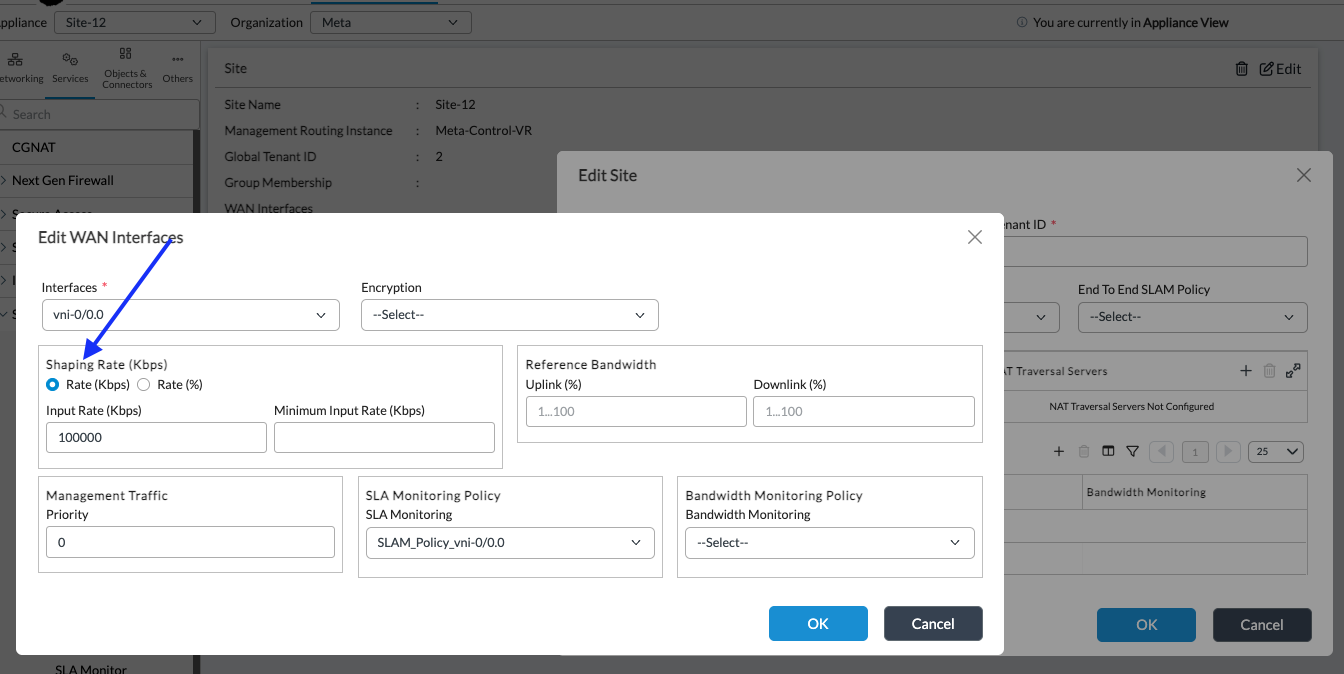
Navigate to the Hub Node configuration.
Go to Configuration > Services > SDWAN > Site.
Edit the relevant WAN interface (e.g.,
vni-0/0.0).
Key Configuration Details:
Input Rate (Kbps): Enter the maximum receiving rate that this branch will advertise via the SD-WAN control plane.
Static vs. Percentage Calculation:
Static Value: You can manually enter a specific rate in Kbps (e.g.,
100000for 100 Mbps) as shown in the image above.Percentage (%): Alternatively, if you have already defined the physical line rate limits under the Uplink and Downlink sections of the WAN interface configuration, you can select the Rate (%) radio button. The system will then calculate the advertised input rate as a percentage of that defined capacity.
Minimum Input Rate: This ensures that even during heavy adaptive throttling, the shaper never drops below a functional "floor" value, preventing complete starvation of the link.
Adaptive Shaping Scaling Guidelines:
Adaptive Shaping requires scaling guidelines. Versa FlexVNF has a total of 4096 pipes per interface (no concept of tenant) and two pipes are created for each adaptive shaping instance. For each interface, Versa FlexVNF requires two separate pipes per adaptive shaper for each branch and tenant. One pipe is used for the non-encrypted path and the other pipe is used for the encrypted path (these two paths are always present in a default Versa SD-WAN deployment).
This means you can run through the 4096 limit by:
- Having 2097 branches with one WAN interface and one tenant.
- Having one branch with a single interface, but 2097 tenants.
It must be noted that for Adaptive Shaping in Versa FlexVNF, these pipes are only relevant to the sending branch since this is where the shaping is done. The SD-WAN control plane “activates” instantiation of the pipe on the sending branch when the receiving branch enables the Input Rate.
Excise caution while configuring Versa FlexVNF with many branches. A typical SD-WAN is made of sites that function more as centralized hub sites and others that function more as decentralized remote sites, Versa recommends enabling such Input Rate only for the centralized hub sites.
Monitoring and verifying Adaptive Shaping:
Once configured, you can verify the dynamic behavior of Adaptive Shaping using the Versa CLI. This allows you to observe how the sender throttles traffic in real-time based on the feedback received from the destination.
- On the Sender (Spoke) side, you can verify the initial state of the PIPE shaper created toward the Hub. At this stage, the Hub has advertised its Input Rate, and the Spoke has built a shaper to match it.
Run the following command on the sender branch:
cli> show class-of-services interfaces extensive vni-0/0
- Look for the Secure portion of the PIPE.
- You will see the PIPE created with the 100,000 Kbps (100 Mbps) input rate advertised by the Hub.
- If there is no active traffic, theTX bpswill show as idle.admin@Site11-cli> show class-of-services interfaces extensive Interface: vni-0/0 Configuration: Burst Size : 1250000 bytes Rate : 10000000 kbps TC0: Network-Control : 10000000-10000000 kbps TC1: Expedited-Forwarding : 10000000-10000000 kbps TC2: Assured-Forwarding : 10000000-10000000 kbps TC3: Best-Effort : 10000000-10000000 kbps Traffic Stats: TX Packets : 13016478 TX PPS : 0 TX Packets Dropped : 1800855 TX Bytes : 15405666691 TX bps : 0 TX Bytes Dropped : 2068612010 Port Stats : Traffic Class TX Pkts TX Dropped TX Bytes Bytes Dropped tc0 network-control 67608 0 31082053 0 tc1 expedited-fwd 10161 0 2971486 0 tc2 assured-fwd 0 0 0 0 tc3 best-effort 12938709 1800855 15371613152 2068612010 Pipe Stat: Pipe ID : 4 Users : [ Site-12:Broadband:Broadband:Meta:clear ] Type : SDWAN Configuration : Rate : 73237 kbps TC0: Network-Control : 73237-73237 kbps TC1: Expedited-Forwarding : 73237-73237 kbps TC2: Assured-Forwarding : 73237-73237 kbps TC3: Best-Effort : 73237-73237 kbps Traffic Stats: Queues Cfg Inferred TX TX TX Bytes Qlen Avg Avg Drop Wt BW kbps Pkts Dropped Bytes Dropped Rate bps rate bps tc0 network-control: q0: fc_nc 1 18309-73237 8 0 6592 0 0 0 0 q1: fc1 1 18309-73237 0 0 0 0 0 0 0 q2: fc2 1 18309-73237 0 0 0 0 0 0 0 q3: fc3 1 18309-73237 0 0 0 0 0 0 0 tc1 expedited-fwd: q0: fc_ef 1 18309-73237 0 0 0 0 0 0 0 q1: fc5 1 18309-73237 0 0 0 0 0 0 0 q2: fc6 1 18309-73237 0 0 0 0 0 0 0 q3: fc7 1 18309-73237 0 0 0 0 0 0 0 tc2 assured-fwd: q0: fc_af 1 18309-73237 0 0 0 0 0 0 0 q1: fc9 1 18309-73237 0 0 0 0 0 0 0 q2: fc10 1 18309-73237 0 0 0 0 0 0 0 q3: fc11 1 18309-73237 0 0 0 0 0 0 0 tc3 best-effort: q0: fc_be 1 18309-73237 0 0 0 0 0 0 0 q1: fc13 1 18309-73237 0 0 0 0 0 0 0 q2: fc14 1 18309-73237 0 0 0 0 0 0 0 q3: fc15 1 18309-73237 0 0 0 0 0 0 0 Pipe ID : 5 Users : [ Site-12:Broadband:Broadband:Meta:secure ] Type : SDWAN Configuration : Rate : 73237 kbps TC0: Network-Control : 73237-73237 kbps TC1: Expedited-Forwarding : 73237-73237 kbps TC2: Assured-Forwarding : 73237-73237 kbps TC3: Best-Effort : 73237-73237 kbps Traffic Stats: Queues Cfg Inferred TX TX TX Bytes Qlen Avg Avg Drop Wt BW kbps Pkts Dropped Bytes Dropped Rate bps rate bps tc0 network-control: q0: fc_nc 1 18309-73237 1 0 138 0 0 0 0 q1: fc1 1 18309-73237 0 0 0 0 0 0 0 q2: fc2 1 18309-73237 0 0 0 0 0 0 0 q3: fc3 1 18309-73237 0 0 0 0 0 0 0 tc1 expedited-fwd: q0: fc_ef 1 18309-73237 2310 0 466620 0 0 0 0 q1: fc5 1 18309-73237 0 0 0 0 0 0 0 q2: fc6 1 18309-73237 0 0 0 0 0 0 0 q3: fc7 1 18309-73237 0 0 0 0 0 0 0 tc2 assured-fwd: q0: fc_af 1 18309-73237 0 0 0 0 0 0 0 q1: fc9 1 18309-73237 0 0 0 0 0 0 0 q2: fc10 1 18309-73237 0 0 0 0 0 0 0 q3: fc11 1 18309-73237 0 0 0 0 0 0 0 tc3 best-effort: q0: fc_be 1 18309-73237 2247337 1775123 2660610782 2030378474 0 80408528 88330280 q1: fc13 1 18309-73237 0 0 0 0 0 0 0 q2: fc14 1 18309-73237 0 0 0 0 0 0 0 q3: fc15 1 18309-73237 0 0 0 0 0 0 0 Pipe ID : 0 Users : [ Default ] Type : Access circuit Configuration : Burst Size : 1250000 bytes Rate : 10000000 kbps TC0: Network-Control : 10000000-10000000 kbps TC1: Expedited-Forwarding : 10000000-10000000 kbps TC2: Assured-Forwarding : 10000000-10000000 kbps TC3: Best-Effort : 10000000-10000000 kbps Traffic Stats: Queues Cfg Inferred TX TX TX Bytes Qlen Avg Avg Drop Wt BW kbps Pkts Dropped Bytes Dropped Rate bps rate bps tc0 network-control: q0: fc_nc 12500000-10000000 1289 0 154832 0 0 0 0 q1: fc1 12500000-10000000 0 0 0 0 0 0 0 q2: fc2 12500000-10000000 0 0 0 0 0 0 0 q3: fc3 12500000-10000000 0 0 0 0 0 0 0 tc1 expedited-fwd: q0: fc_ef 12500000-10000000 0 0 0 0 0 0 0 q1: fc5 12500000-10000000 0 0 0 0 0 0 0 q2: fc6 12500000-10000000 0 0 0 0 0 0 0 q3: fc7 12500000-10000000 0 0 0 0 0 0 0 tc2 assured-fwd: q0: fc_af 12500000-10000000 0 0 0 0 0 0 0 q1: fc9 12500000-10000000 0 0 0 0 0 0 0 q2: fc10 12500000-10000000 0 0 0 0 0 0 0 q3: fc11 12500000-10000000 0 0 0 0 0 0 0 tc3 best-effort: q0: fc_be 12500000-10000000 0 0 0 0 0 0 0 q1: fc13 12500000-10000000 0 0 0 0 0 0 0 q2: fc14 12500000-10000000 0 0 0 0 0 0 0 q3: fc15 12500000-10000000 0 0 0 0 0 0 0 Pipe ID : 1 Users : [ vni-0/0.0 ] Type : Access circuit Configuration : Burst Size : 6250000 bytes Rate : 200000 kbps TC0: Network-Control : 200000-200000 kbps TC1: Expedited-Forwarding : 200000-200000 kbps TC2: Assured-Forwarding : 200000-200000 kbps TC3: Best-Effort : 200000-200000 kbps Traffic Stats: Queues Cfg Inferred TX TX TX Bytes Qlen Avg Avg Drop Wt BW kbps Pkts Dropped Bytes Dropped Rate bps rate bps tc0 network-control: q0: fc_nc 1 50000-200000 66308 0 30920215 0 0 1464 0 q1: fc1 1 50000-200000 0 0 0 0 0 0 0 q2: fc2 1 50000-200000 0 0 0 0 0 0 0 q3: fc3 1 50000-200000 0 0 0 0 0 0 0 tc1 expedited-fwd: q0: fc_ef 1 50000-200000 7851 0 2504866 0 0 0 0 q1: fc5 1 50000-200000 0 0 0 0 0 0 0 q2: fc6 1 50000-200000 0 0 0 0 0 0 0 q3: fc7 1 50000-200000 0 0 0 0 0 0 0 tc2 assured-fwd: q0: fc_af 1 50000-200000 0 0 0 0 0 0 0 q1: fc9 1 50000-200000 0 0 0 0 0 0 0 q2: fc10 1 50000-200000 0 0 0 0 0 0 0 q3: fc11 1 50000-200000 0 0 0 0 0 0 0 tc3 best-effort: q0: fc_be 1 50000-200000 10691372 25732 12711002370 38233536 0 224 0 q1: fc13 1 50000-200000 0 0 0 0 0 0 0 q2: fc14 1 50000-200000 0 0 0 0 0 0 0 q3: fc15 1 50000-200000 0 0 0 0 0 0 0 Interface: vni-0/0.0 Traffic Stats: TX Packets : 10765556 TX PPS : 2 TX Packets Dropped : 25732 TX Bytes : 12744430873 TX bps : 2216 TX Bytes Dropped : 38233536 Pipe Stat: Pipe ID : 1 Users : [ vni-0/0.0 ] Type : Access circuit Configuration : Burst Size : 6250000 bytes Rate : 200000 kbps TC0: Network-Control : 200000-200000 kbps TC1: Expedited-Forwarding : 200000-200000 kbps TC2: Assured-Forwarding : 200000-200000 kbps TC3: Best-Effort : 200000-200000 kbps Traffic Stats: Queues Cfg Inferred TX TX TX Bytes Qlen Avg Avg Drop Wt BW kbps Pkts Dropped Bytes Dropped Rate bps rate bps tc0 network-control: q0: fc_nc 1 50000-200000 66322 0 30922535 0 0 912 0 q1: fc1 1 50000-200000 0 0 0 0 0 0 0 q2: fc2 1 50000-200000 0 0 0 0 0 0 0 q3: fc3 1 50000-200000 0 0 0 0 0 0 0 tc1 expedited-fwd: q0: fc_ef 1 50000-200000 7855 0 2505674 0 0 1072 0 q1: fc5 1 50000-200000 0 0 0 0 0 0 0 q2: fc6 1 50000-200000 0 0 0 0 0 0 0 q3: fc7 1 50000-200000 0 0 0 0 0 0 0 tc2 assured-fwd: q0: fc_af 1 50000-200000 0 0 0 0 0 0 0 q1: fc9 1 50000-200000 0 0 0 0 0 0 0 q2: fc10 1 50000-200000 0 0 0 0 0 0 0 q3: fc11 1 50000-200000 0 0 0 0 0 0 0 tc3 best-effort: q0: fc_be 1 50000-200000 10691379 25732 12711002664 38233536 0 224 0 q1: fc13 1 50000-200000 0 0 0 0 0 0 0 q2: fc14 1 50000-200000 0 0 0 0 0 0 0 q3: fc15 1 50000-200000 0 0 0 0 0 0 0 [ok][2026-03-05 16:34:21] admin@Site11-cli> admin@Site11-cli> admin@Site11-cli> admin@Site11-cli> show class-of-services interfaces extensive admin@Site11-cli> request clear interfaces port statistics [ok][2026-03-05 16:35:09] admin@Site11-cli> show class-of-services interfaces extensive Interface: vni-0/0 Configuration: Burst Size : 1250000 bytes Rate : 10000000 kbps TC0: Network-Control : 10000000-10000000 kbps TC1: Expedited-Forwarding : 10000000-10000000 kbps TC2: Assured-Forwarding : 10000000-10000000 kbps TC3: Best-Effort : 10000000-10000000 kbps Traffic Stats: TX Packets : 646 TX PPS : 2 TX Packets Dropped : 0 TX Bytes : 242439 TX bps : 2496 TX Bytes Dropped : 0 Port Stats : Traffic Class TX Pkts TX Dropped TX Bytes Bytes Dropped tc0 network-control 585 0 235300 0 tc1 expedited-fwd 27 0 5454 0 tc2 assured-fwd 0 0 0 0 tc3 best-effort 34 0 1685 0 Pipe Stat: Pipe ID : 4 Users : [ Site-12:Broadband:Broadband:Meta:clear ] Type : SDWAN Configuration : Rate : 100000 kbps TC0: Network-Control : 100000-100000 kbps TC1: Expedited-Forwarding : 100000-100000 kbps TC2: Assured-Forwarding : 100000-100000 kbps TC3: Best-Effort : 100000-100000 kbps Traffic Stats: Queues Cfg Inferred TX TX TX Bytes Qlen Avg Avg Drop Wt BW kbps Pkts Dropped Bytes Dropped Rate bps rate bps tc0 network-control: q0: fc_nc 1 25000-100000 0 0 0 0 0 0 0 q1: fc1 1 25000-100000 0 0 0 0 0 0 0 q2: fc2 1 25000-100000 0 0 0 0 0 0 0 q3: fc3 1 25000-100000 0 0 0 0 0 0 0 tc1 expedited-fwd: q0: fc_ef 1 25000-100000 0 0 0 0 0 0 0 q1: fc5 1 25000-100000 0 0 0 0 0 0 0 q2: fc6 1 25000-100000 0 0 0 0 0 0 0 q3: fc7 1 25000-100000 0 0 0 0 0 0 0 tc2 assured-fwd: q0: fc_af 1 25000-100000 0 0 0 0 0 0 0 q1: fc9 1 25000-100000 0 0 0 0 0 0 0 q2: fc10 1 25000-100000 0 0 0 0 0 0 0 q3: fc11 1 25000-100000 0 0 0 0 0 0 0 tc3 best-effort: q0: fc_be 1 25000-100000 0 0 0 0 0 0 0 q1: fc13 1 25000-100000 0 0 0 0 0 0 0 q2: fc14 1 25000-100000 0 0 0 0 0 0 0 q3: fc15 1 25000-100000 0 0 0 0 0 0 0 Pipe ID : 5 Users : [ Site-12:Broadband:Broadband:Meta:secure ] Type : SDWAN Configuration : Rate : 100000 kbps TC0: Network-Control : 100000-100000 kbps TC1: Expedited-Forwarding : 100000-100000 kbps TC2: Assured-Forwarding : 100000-100000 kbps TC3: Best-Effort : 100000-100000 kbps Traffic Stats: Queues Cfg Inferred TX TX TX Bytes Qlen Avg Avg Drop Wt BW kbps Pkts Dropped Bytes Dropped Rate bps rate bps tc0 network-control: q0: fc_nc 1 25000-100000 0 0 0 0 0 0 0 q1: fc1 1 25000-100000 0 0 0 0 0 0 0 q2: fc2 1 25000-100000 0 0 0 0 0 0 0 q3: fc3 1 25000-100000 0 0 0 0 0 0 0 tc1 expedited-fwd: q0: fc_ef 1 25000-100000 9 0 1818 0 0 536 0 q1: fc5 1 25000-100000 0 0 0 0 0 0 0 q2: fc6 1 25000-100000 0 0 0 0 0 0 0 q3: fc7 1 25000-100000 0 0 0 0 0 0 0 tc2 assured-fwd: q0: fc_af 1 25000-100000 0 0 0 0 0 0 0 q1: fc9 1 25000-100000 0 0 0 0 0 0 0 q2: fc10 1 25000-100000 0 0 0 0 0 0 0 q3: fc11 1 25000-100000 0 0 0 0 0 0 0 tc3 best-effort: q0: fc_be 1 25000-100000 0 0 0 0 0 0 0 q1: fc13 1 25000-100000 0 0 0 0 0 0 0 q2: fc14 1 25000-100000 0 0 0 0 0 0 0 q3: fc15 1 25000-100000 0 0 0 0 0 0 0 Real-Time Dynamic Shaping (During Congestion)
To test the mechanism, we initiate an
iperftest from the Sender, attempting to push 150 Mbps toward a Hub configured with a 100 Mbps Input Rate.Because our High Threshold is 85%, the Hub will signal the Spoke to throttle down by 10% every 10 seconds (the poll interval) until congestion is mitigated. Observe the
TX bpson the Spoke decreasing in increments:First Iteration: The shaper is active. High packet drops are visible at the source because the iperf is over-driving the shaper.
TX bps : 101,998,376 (~102 Mbps)
After some time (Second Iteration): The Hub has signaled a reduction.
TX bps : 94,347,816 (~94 Mbps)
After further time (Third Iteration): The Hub continues to signal reductions as utilization remains high.
TX bps : 82,581,176 (~82 Mbps)
Application-Level Impact (iperf Stats)
The difference between the Sender's attempt and the Receiver's reality confirms the shaper is working at the source (SD-WAN edge) rather than the Hub's ingress.
Sender Machine: Continues to try pushing at the configured limit.
[ 4] 44.00-45.00 sec 17.9 MBytes 150 Mbits/secReceiver (Hub) Side: The traffic is effectively capped and reduced by the adaptive mechanism.
[ 5] 1.00-2.00 sec 10.2 MBytes 85.6 Mbits/sec (Throttling starts)[ 5] 24.00-25.00 sec 9.16 MBytes 76.8 Mbits/sec (Further reduction)
Verifying the Shaping Cache (Hub Side)
To see the internal decision-making process on the Hub, you can access the VSM (Versa Service Manager) shell. This shows the current vs. old advertised rates.
Enter the VTY terminal:vsh connect vsmd
Run the shaping cache command:show vsm p2mp shaping cache
| Cfg InpRate | The static or % rate configured in the GUI (e.g., 100,000 Kbps). |
| Curr InpRate | The actual rate currently being advertised to Spokes. |
| Old InpRate | The rate advertised in the previous interval. |